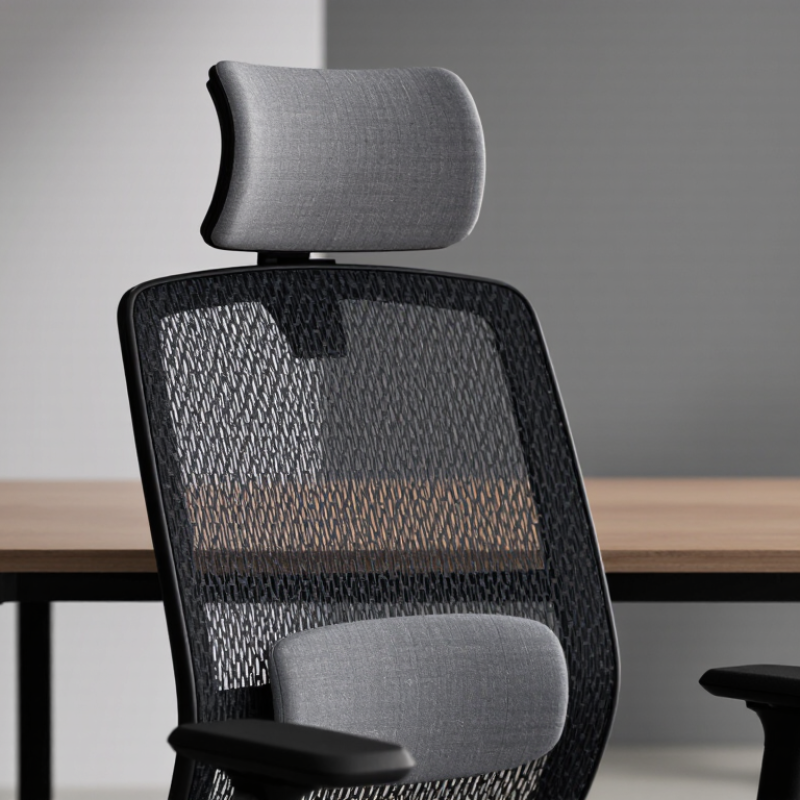
A headrest can change how an office chair supports your body during long workdays. But its value depends on fit, adjustment, and actual use. What are the benefits of a headrest on an office chair? The answer includes more than simple comfort.
A well-positioned headrest can support the neck during brief reclined pauses. It may reduce the need to hold the head forward continuously. This can ease perceived tension around the neck, shoulders, and upper back. It may also encourage a more relaxed posture during meetings, reading, or screen breaks. Some users notice better support when they lean back to think. Small details matter.
Alan Hedge, a professor emeritus of ergonomics at Cornell University, emphasized, “The best posture is the next posture.” His point remains important here. A headrest should support movement, not trap the head in one position. It should align with the back of the head, without pushing the chin forward. A poorly adjusted cushion can create pressure instead of relief.
This guide examines seven practical benefits, including neck support, improved reclining comfort, and reduced upper-body effort. It also considers possible limitations. A headrest cannot correct a badly adjusted desk, monitor, or seat height. It is not a substitute for movement. That part is easy to forget.
Real office experience is often less perfect than product descriptions suggest. Some headrests feel helpful after ten minutes but awkward after two hours. Individual body shape, chair design, and working habits all influence the result. The most useful headrest is adjustable, supportive, and easy to ignore when you do not need it.
What Is an Office Chair Headrest and How Does It Work?
An office chair headrest is a padded support for your head and upper neck. It attaches to the chair’s backrest through an adjustable frame. Depending on its design, it may move vertically, tilt, or slide forward. These settings help place the cushion near your neck’s natural curve. Small changes matter.
When you lean back, the headrest supports part of your head’s weight. This can reduce forward head posture during reading, video meetings, or short breaks. It may also relax the neck and shoulder muscles after long computer sessions. Proper contact should feel supportive, not forceful. Keep your ears roughly above your shoulders, and let your eyes meet the screen without bending your chin downward. If the cushion pushes your head forward, lower it or move it backward.
From an ergonomic perspective, a headrest works best with a properly adjusted seat, backrest, desk, and monitor. It cannot correct every posture problem. In my experience, users often raise it too high because it feels more noticeable there. That position can create pressure near the base of the skull. Try several settings while reclining and sitting upright. Your neck should feel supported, not trapped. A headrest may also make brief rest periods easier, although some people find it distracting when working actively. Personal comfort matters, but it should be checked against neutral alignment.
How a Headrest Supports the Neck and Promotes Spinal Alignment
7 Best Benefits of a Headrest on an Office Chair
How a Headrest Supports the Neck and Promotes Spinal Alignment
A headrest can reduce the effort required to keep your head upright during long work sessions. It supports the neck when you lean back, helping your cervical spine stay closer to its natural curve. This may ease pressure around the neck and upper shoulders. It can also encourage a more balanced sitting posture, reduce forward-head positioning, and limit muscle fatigue. Small changes matter.
The best support reaches the back of your head without pushing it forward. Adjust the height until the cushion meets the base of your skull. Keep your ears roughly above your shoulders. Your screen should remain near eye level, so you do not tilt your chin upward. A suitable headrest may improve relaxation, posture awareness, and comfort during calls, reading, or short breaks. It also gives the neck a stable resting point when reclining.
Fit is personal. A headrest cannot correct every ergonomic problem, and excessive pressure may create new discomfort. In practical workstation checks, users often adjust the chair but ignore desk height, screen distance, or arm support. That is a mistake. Try several positions during the day. Notice whether your neck feels supported rather than forced. If pain, numbness, or weakness persists, seek advice from a qualified healthcare professional. The chair helps, but it does not replace movement.
Seven Key Benefits of Using an Office Chair Headrest
Seven Key Benefits of Using an Office Chair Headrest
A headrest can support the neck during short pauses, video calls, and reclined work. It may reduce the urge to hold the head forward. OSHA’s Computer Workstations eTool recommends adjustable seating and neutral head positioning. A properly adjusted headrest supports that position without pushing the chin downward. It can also encourage relaxed shoulders. Small changes matter.
The seven practical benefits include neck support, improved posture awareness, reduced static muscle effort, greater comfort, safer reclining, easier micro-breaks, and better accommodation for different body sizes. A 2022 World Health Organization report estimated that 1.71 billion people live with musculoskeletal conditions worldwide. That figure does not prove a headrest prevents pain. It does show why workplace ergonomics deserves careful attention. During a five-minute reading break, the cushion can support the back of the skull and upper neck. During a longer meeting, it may reduce repeated neck holding.
Adjustment remains essential. The headrest should meet the natural curve behind the head, not force the head forward. It should also allow movement. A 2021 review in Applied Ergonomics emphasized that workstation comfort depends on fit, posture, and task variation, rather than one product alone. I have found that a headrest feels helpful when reclining, but distracting while typing intensely. That limitation is easy to miss. Short users may need a lower setting, while taller users may need more height. It is useful, but not magic.
7 Best Benefits of a Headrest on an Office Chair? - Seven Key Benefits of Using an Office Chair Headrest
No.
Key Benefit
Primary Area Supported
How It Helps
Most Useful When
Important Adjustment
1
Supports the Head and Neck
Cervical spine and upper neck
A properly positioned headrest can provide light support when the head is resting back, reducing the need to hold the head unsupported for extended periods.
During reclining, reading, video meetings, or brief rest breaks
Set the height and angle so the pad supports the back of the head or upper neck without pushing the head forward.
2
Encourages a Neutral Head Position
Head, neck, and upper back alignment
Head support may make it easier to maintain a comfortable, neutral position instead of allowing the head to drift forward while the chair is reclined.
Extended computer work and tasks that involve frequent screen viewing
Keep the monitor near eye level; a headrest cannot correct a poorly positioned screen or desk.
3
May Reduce Neck and Shoulder Fatigue
Neck and shoulder muscles
By offering intermittent support, a headrest may reduce the continuous muscular effort required to stabilize the head in relaxed, supported postures.
Long seated sessions with periodic reclining
Use the headrest as supplemental support rather than leaning heavily on it throughout the entire workday.
4
Improves Reclining Comfort
Head, neck, and upper torso
A headrest helps create a more supported posture when the backrest is reclined, making position changes more comfortable.
Phone calls, online meetings, reading, and recovery pauses
Coordinate the headrest with the backrest angle and lumbar support; all three should work together.
5
How Proper Headrest Adjustment Improves Comfort and Posture
A headrest helps most when it supports your posture without forcing your head forward. I used to raise mine too high, leaving pressure beneath my skull after long editing sessions. Start with height. Set the cushion near the back of your head, not directly under your neck. It should feel neutral. The support should touch gently when you sit upright, while your chin remains level. If your head tilts upward, lower the headrest slightly. If your shoulders lift, it may be too low or too firm.
Depth and angle matter as much as height. Adjust the headrest so it follows the natural curve behind your head. Your ears should stay roughly over your shoulders, rather than drifting toward the monitor. A small tilt backward can reduce neck tension during reading, but too much recline may strain your eyes. Keep the screen near eye level and about an arm’s length away. Let your elbows rest comfortably, and keep both feet supported.
I still catch myself leaning forward during busy work. That is useful feedback, not failure. Reset your position every hour. Move your neck gently and check whether the headrest is helping or merely holding your head in place. Persistent pain, numbness, or weakness deserves assessment from a qualified healthcare professional.
What to Consider When Choosing a Supportive Office Chair Headrest
A supportive office chair headrest should meet your body, not force your neck into position. Sit back with your shoulders relaxed and check whether the cushion supports the natural curve below your skull. If it pushes your head forward, or leaves a gap when you recline, its shape or placement may not suit you. Small details matter.
Look for height and angle adjustments that stay put during ordinary movement. A headrest that slides down every few minutes becomes a distraction. Depth adjustment can also help: the cushion should feel close enough to support you without pressing your head forward.
If possible, test it while sitting upright and leaning back, since the best setting may differ between tasks. There is no single ideal position for every person.
Check the chair’s backrest and headrest together. Some headrests work only when the chair is reclined, so they may offer little support during focused desk work. Upholstery should feel comfortable against your hair and skin, while a firm, stable cushion is less likely to collapse quickly. Spend a few minutes seated before deciding. That still may not reveal long-term comfort, and I’ve found showroom posture can feel different from a full workday. A headrest is optional; prioritize a well-fitting chair and a posture you can change comfortably.
FAQS
How can a headrest support the neck during a workday?
It gives your head a resting point when you recline. This may reduce effort and ease neck and shoulder pressure.
Where should a chair headrest sit?
Adjust it to meet the base of your skull without pushing your head forward. Keep your ears roughly above your shoulders.
Can a headrest improve sitting posture?
It may help limit forward-head positioning and support posture awareness. It cannot fix every ergonomic problem.
How can I tell if a headrest fits me?
Sit upright, then lean back. It should support your neck without forcing your head into an uncomfortable position.
Why do height, angle, and depth adjustments matter?
They help you match the cushion to your body and different tasks. A headrest that keeps sliding can become a distraction.
Does every headrest work during focused desk tasks?
No. Some support the head only when the chair is reclined, so they may offer little help while sitting upright.
What else should I check at my workstation?
Keep the screen near eye level and check desk height, screen distance, and arm support. Small details can matter.
What should I do if neck discomfort continues?
Change positions and notice whether the support feels gentle, not forced. Seek qualified healthcare advice if pain, numbness, or weakness persists.
Conclusion
An office chair headrest is a supportive cushion designed to cradle the head and neck while seated. By maintaining the neck in a more natural position, it can encourage better spinal alignment and reduce the tendency to lean forward or hunch over a desk. What are the benefits of a headrest on an office chair? Key advantages include reduced neck and shoulder tension, improved posture, greater comfort during long work sessions, less pressure on the upper spine, better support while reclining, reduced fatigue, and a more relaxed sitting experience.
For the best results, the headrest should be adjusted so it supports the back of the head or upper neck without pushing the head forward. Its height, angle, depth, and firmness should suit the user’s body and working habits. When choosing a supportive headrest, consider adjustability, cushioning, stability, breathable materials, and compatibility with the chair. A properly fitted headrest should complement active sitting rather than replace regular movement and posture changes.
Ethan is a seasoned marketing professional with a deep expertise in our company's innovative product line. With a passion for sharing knowledge and insights, he takes the lead in regularly updating our corporate blog, where he explores industry trends, product features, and effective marketing......
 WorkX Chair