WorkX Chair
Working long hours in an office setting can significantly affect physical well-being. According to the Occupational Safety and Health Administration (OSHA), about 70% of office workers experience discomfort due to poor seating arrangements. Understanding "how to sit properly in an ergonomic chair for 8 hours" is vital for maintaining health and productivity. Research shows that proper posture can reduce the risk of musculoskeletal disorders by 30% or more.
The design of ergonomic chairs aims to support the natural curve of the spine. However, simply sitting in these chairs is not enough. A study published in the Journal of Occupational Health indicates that slightly over 50% of employees do not adjust their chairs correctly. Many people overlook simple adjustments, like seat height and lumbar support, that enhance comfort.
Moreover, sitting for extended periods can lead to mental fatigue as well. Just a few minutes of stretching every hour can rejuvenate focus. It is crucial to recognize that even with the best tools, consistent effort is needed to maintain proper posture and overall health. Ergonomics is not solely about the chair; it includes how we use it.
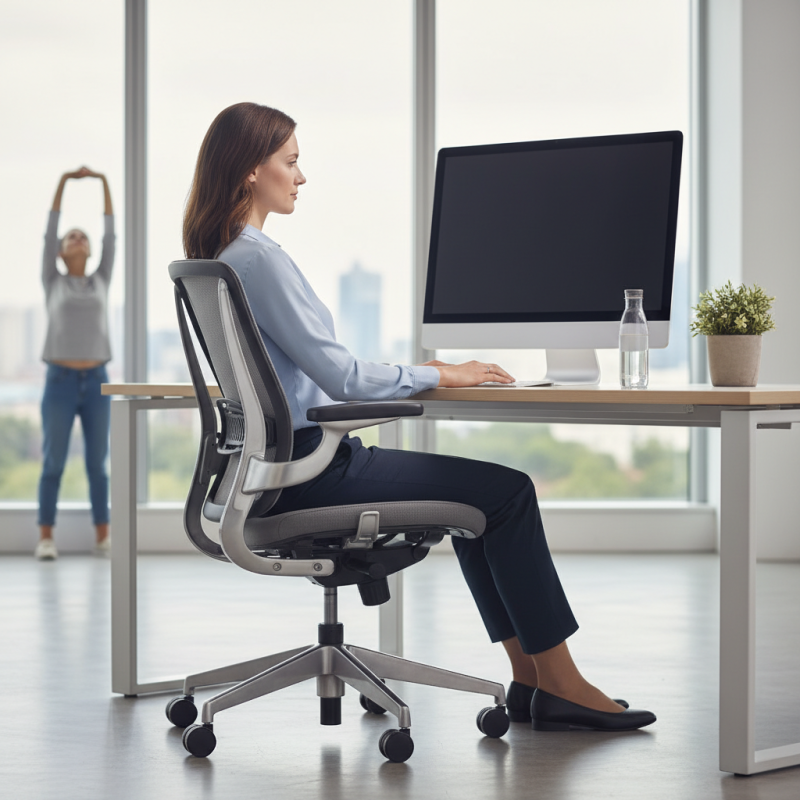
Understanding ergonomics is crucial for anyone who spends long hours sitting. Poor posture can lead to discomfort and long-term health issues. When you sit for extended periods, maintaining a neutral spine position is essential. Your feet should be flat on the ground, with your knees at a right angle. This promotes blood circulation and reduces fatigue.
Comfort doesn't always mean correct support. Many people adjust their chairs but forget the alignment of their desk or screen. Screens should be at eye level. If not, you might strain your neck and back. Take periodic breaks to stand and stretch. Moving, even for a few minutes, can refresh your body and mind.
Consider your arm positioning as well. Ideally, your elbows should rest comfortably while typing. If your wrists are bent, it can lead to strain. While you may think you're seated correctly, small adjustments can make a significant difference over time. Regular reflection on your sitting habits can help you stay mindful of proper ergonomics.
Choosing the right ergonomic chair is crucial. Not all chairs fit every body type. Consider your height, weight, and sitting habits. A well-fitted chair reduces discomfort during long hours of sitting.
Look for adjustable features. A chair should have adjustable seat height and lumbar support. This allows you to customize your seating position. If the chair lacks these features, it may not provide adequate support. Many users find themselves slouching without proper lumbar support. This can lead to back pain over time.
Test the chair before purchasing. Spend some time sitting in it. Note how it feels after 10 or 15 minutes. Does it creak or shift? Pay attention to pressure points. Your choice should enhance comfort over long periods. Remember, a chair that feels good right away may not be the best choice for extended use. Your body needs time to adjust, and you should be willing to reflect on your experience each day.
Adjusting your ergonomic chair properly can make a significant difference in your comfort during long hours of sitting. Start by setting the chair height so your feet rest flat on the floor. Your knees should be at a 90-degree angle, allowing for optimal blood circulation. If your chair has a seat depth adjustment, ensure it supports your lower back while leaving a couple of inches between the back of your knees and the seat.
Next, focus on the lumbar support. This part of the chair should fit snugly against your lower back. An adjustable lumbar feature can improve spinal alignment, reducing strain. The armrests are another crucial adjustment. They should support your arms without raising your shoulders. Your elbows should remain at a 90-degree angle as your hands rest on your desk.
Many people neglect to reevaluate their settings throughout the day. As you shift positions, take the time to readjust your chair. This simple practice can alleviate discomfort and fatigue. Don't hesitate to make minor tweaks as needed. Being mindful of these adjustments allows you to maintain focus on your work without physical distractions.
| Adjustment Feature | Recommended Setting | Benefits |
|---|---|---|
| Seat Height | Elbow Height | Ensures feet are flat on the ground; promotes blood circulation |
| Backrest Angle | 100-110 degrees | Supports natural spine curvature; reduces back strain |
| Lumbar Support | Adjust to fit lower back | Prevents lower back pain; promotes proper posture |
| Armrest Height | Shoulder relaxed | Reduces shoulder strain; allows for relaxed arms |
| Seat Depth | 2-3 fingers from knee | Prevents leg strain; allows for proper circulation |
| Footrest Position | Feet flat or slightly raised | Improves comfort; reduces pressure on legs |
Maintaining proper posture while sitting is crucial for long hours at a desk. Start by adjusting your chair. Sit back fully and ensure your lower back is supported. This alignment can help reduce discomfort over time. Your feet should rest flat on the floor or on a footrest. Your knees should be slightly lower than your hips, allowing for better circulation.
Adjust the height of your monitor. It should be at eye level to avoid straining your neck. Keeping your elbows close to your body helps reduce shoulder tension. Additionally, take frequent breaks to stand up and stretch. This will relieve pressure on your spine and encourage movement.
Pay attention to any discomfort or fatigue. It’s a signal that your posture might need adjusting. Actively monitor how you're sitting throughout the day. Make small changes to stay comfortable. Create a habit of checking your alignment regularly. This reflection can help you discover what feels right.
Long hours in an ergonomic chair can still lead to discomfort. Integrating breaks into your routine is essential. Research indicates that taking brief breaks every 30 to 60 minutes can significantly reduce fatigue and pain. A study showed that individuals who moved regularly reported a 47% increase in overall comfort. Simple stretches or short walks can rejuvenate your body.
Movement boosts blood circulation, enhancing focus. Incorporate standing or stretching every hour. Even a few minutes of movement can reset your posture and relieve tension. Some experts recommend desk exercises, such as neck rolls and wrist stretches. These actions take mere minutes but can have lasting effects on your well-being.
Reflect on your habits. Are you sitting for hours without moving? This sedentary pattern can lead to various health issues over time. By recognizing these behaviors, you can adjust your routine. An intentional approach towards breaks can reshape your workday, making it more productive and comfortable.
: Ergonomics prevents discomfort and long-term health issues from prolonged sitting.
Your spine should be neutral. Feet flat on the ground with knees at a right angle is best.
Screens should be at eye level. Misalignment can strain your neck and back over time.
Periodic breaks help refresh your body and mind, reducing fatigue and discomfort.
Keep your elbows close to your body and wrists straight to avoid strain.
Regularly check your alignment. Notice any discomfort or fatigue which signals adjustments are needed.
Adjust chair height and monitor placement. Small tweaks can make a significant difference over time.
No, comfort doesn’t always mean correct support. Regular reflection on your posture is crucial.
Make it a habit to check your posture frequently throughout the day for improvements.
Many focus on chair adjustments but neglect desk and monitor alignment, leading to poor posture.
In today's work environment, understanding how to sit properly in an ergonomic chair for 8 hours is crucial for maintaining health and productivity. The first step involves recognizing the importance of ergonomics, particularly when engaging in prolonged sitting periods. Choosing the right ergonomic chair tailored to your body type can greatly enhance comfort and support.
Once you have the appropriate chair, adjusting it to fit your needs becomes essential. This includes setting the height, backrest angle, and armrest position to promote proper posture. Key techniques for maintaining alignment while seated include keeping your feet flat on the ground and your shoulders relaxed. Additionally, incorporating regular breaks and movement throughout the day is vital for reducing discomfort and boosting overall well-being. By following these guidelines, you can significantly improve your sitting experience over extended periods.