When Should I Replace My Old Office Chair A Buyers Guide?

Time:2026-09-14 Author:Sienna
0%

When should I replace my old office chair? The answer is rarely found on its appearance alone. A chair may look polished while its gas lift slowly sinks, its lumbar support feels flat, or its casters resist every turn. Those small failures change posture throughout a workday.

The World Health Organization reported in its 2023 Low Back Pain fact sheet that approximately 619 million people experienced low back pain in 2020. Office seating is not the only cause, but poor support can worsen discomfort during long periods of sitting. The U.S. Occupational Safety and Health Administration also advises users to adjust chair height, backrest support, and armrests for a neutral working position. These recommendations make replacement a practical decision, not merely a style upgrade.

Ergonomist Alan Hedge, formerly of Cornell University, stated, “The chair is the most important piece of office equipment.” His point remains useful. If your chair no longer holds its height, tilts unpredictably, exposes damaged padding, or leaves pressure beneath your thighs, replacement deserves serious consideration. Persistent pain also requires professional medical advice.

There is no perfect expiration date. Many chairs last longer than expected, while cheaper models may deteriorate within a few years. That is the inconvenient part. A visible crack is easy to judge; gradual discomfort is not. This guide examines warning signs, repair options, warranty details, and ergonomic fit, helping you decide whether your old chair needs maintenance or a permanent goodbye.
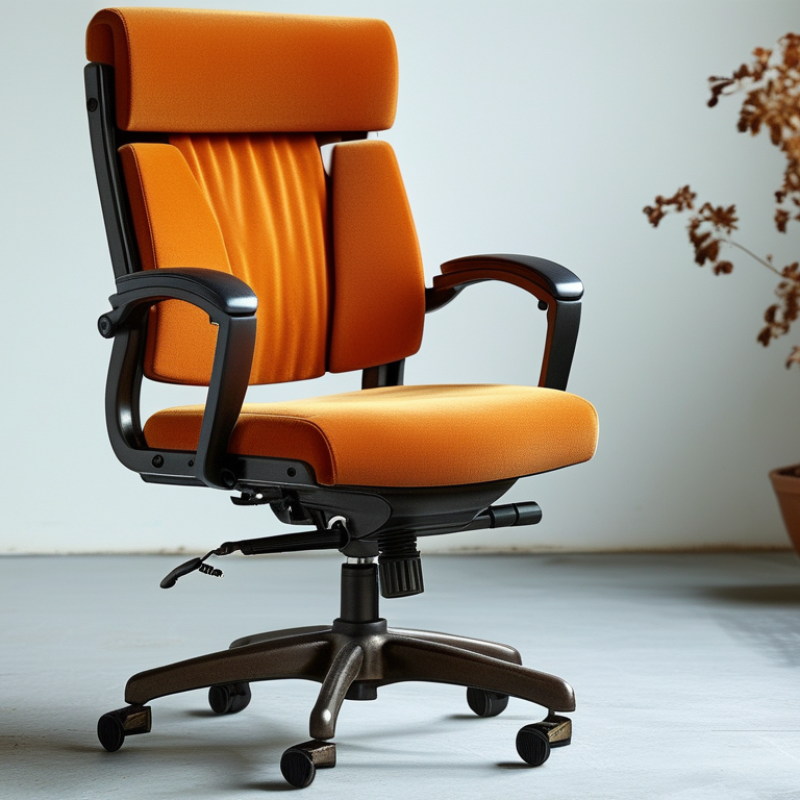
When Should I Replace My Old Office Chair A Buyers Guide?

Signs Your Office Chair Has Reached the End of Its Useful Life

When Should I Replace My Old Office Chair A Buyers Guide?

Signs Your Office Chair Has Reached the End of Its Useful Life

An old office chair rarely fails without warning. Start by checking its stability. Sit down slowly and notice any rocking, tilting, or uneven movement. A cracked five-point base, loose wheels, or a damaged frame can create a serious fall risk. Replace those parts only when they meet the chair’s specifications. Improvised repairs are not worth the gamble.

A sinking seat often points to a worn gas lift. Test the height lever several times. If the seat drops during work, your knees and hips may lose proper alignment. Check the backrest, too. It should support your lower back without sudden slipping. Broken adjustment locks, exposed screws, and sharp edges show that the chair needs attention. Small faults become annoying quickly.

Pain is another important signal. Persistent neck, shoulder, or lower-back discomfort may indicate poor support, although a chair is not the only possible cause. An ergonomic specialist can assess your posture and work setup. I once kept using a chair because its fabric looked fine. That was poor judgment. The cushion had flattened, and I leaned forward for hours. Look for permanently compressed foam, torn upholstery, and armrests that no longer support relaxed shoulders. If repairs cost nearly as much as a dependable replacement, replacing the chair is usually the more sensible choice.

When Should I Replace My Old Office Chair?

Signs Your Office Chair Has Reached the End of Its Useful Life

How to read this chart: A score of 3 indicates an immediate replacement priority, while a score of 2 suggests repair or replacement should be planned soon. Any structural damage, loss of stability, or persistent discomfort should be treated as a high-priority safety or ergonomic concern.

How Chair Age and Daily Use Affect Replacement Timing

When Should I Replace My Old Office Chair? A Buyer’s Guide

Chair age matters, but daily use matters more. A chair used eight hours daily may wear faster than one used occasionally. Cushion compression, uneven height, loose arms, and a sinking gas lift are practical warning signs. The ANSI/BIFMA X5.1-2017 standard includes durability tests reaching 100,000 cycles for some chair components. That benchmark supports quality testing, not a guaranteed service life. OSHA’s Computer Workstations eTool also stresses adjustable seating and stable support. A chair can look acceptable while its adjustment system quietly fails.

My own mistake was waiting for visible damage. After several weeks, I noticed hip pressure, a tilted seat, and frequent posture changes. These details matter. Replace the chair when adjustments no longer hold, the base feels unstable, or discomfort appears repeatedly during normal work. Heavy users should inspect monthly. Light users may need replacement less often. Age alone is not enough.

Tips: Record the chair’s purchase date. Test every lever before buying a replacement. Sit for at least ten minutes. Check whether your feet rest flat and your lower back feels supported. Review the manufacturer’s maintenance guidance, but question vague lifespan claims. A repair may solve a wheel or arm problem. Persistent discomfort deserves professional attention.

Health and Comfort Problems That Signal It Is Time to Upgrade

An aging office chair can quietly change how your body works. Flattened foam may tilt your pelvis, while a loose backrest can force your shoulders forward. These small adjustments often become daily habits. The World Health Organization reports that low back pain affected 619 million people worldwide in 2020. A chair does not cause every case, but poor support can aggravate discomfort.

Replace the chair when height controls slip, wheels catch, or the seat stays uneven after adjustment. Persistent numbness, hip pressure, neck tension, or pain after short work sessions also deserve attention. The U.S. Bureau of Labor Statistics continues to record musculoskeletal disorders among common workplace injuries involving days away from work. That statistic is not chair-specific, yet it shows why workstation comfort deserves practical attention. I have found that “still usable” is not always comfortable. Sometimes, that judgment needs questioning.

Tips: Sit with both feet supported. Keep your knees near hip level. Adjust the backrest before adding cushions. Test the chair for at least twenty minutes, not two. A replacement cannot fix every problem. Seek qualified medical advice when pain persists, spreads, or includes weakness. Also check your desk height, monitor position, and work habits. A perfect chair may still fail beside an unsuitable workstation.

Key Features to Compare When Choosing a New Office Chair

An old office chair often gives quiet warnings before it fails. The seat may tilt unevenly, the cushion may stay compressed, or the wheels may catch on the floor. If you feel back, neck, or hip discomfort after work, inspect the chair rather than blaming your posture alone. A chair should support daily movement, not force you to sit rigidly.

Compare adjustability before appearance. The seat height should let your feet rest flat, with knees near hip level. Check whether the seat depth supports your thighs without pressing behind the knees. Look for lumbar support that can move vertically or adjust in firmness. Armrests should keep your shoulders relaxed while your elbows stay close to your body. They should not block your desk.

Test the recline mechanism carefully. A controlled tilt can reduce pressure during long tasks, but excessive looseness feels unsafe. Five-point bases, smooth casters, and stable construction matter on hard floors and carpet. Breathable fabric may reduce heat, while dense foam usually preserves support longer. I once chose a chair for its soft cushion and regretted it after several weeks. Comfort at five minutes proves little. Sit for at least twenty minutes, change positions, and notice pressure points. Measurements still matter more than attractive photographs.

When Should I Replace My Old Office Chair? A Buyer’s Guide – Key Features to Compare When Choosing a New Office Chair

Comparison Area Signs Your Current Chair Needs Attention What to Look for in a New Chair Practical Buying Guideline
Chair Age and Condition The chair has loose components, cracked upholstery, a weakened base, or repeated mechanical failures. A sturdy five-point base, secure casters, reliable adjustment mechanisms, and durable upholstery. Replace the chair when repairs no longer restore safe, stable, and comfortable operation.
Daily Usage The chair is used for long work sessions but provides little support or causes discomfort by the end of the day. Adjustable seat height, backrest support, armrests, and recline tension suitable for frequent use. Choose features according to actual daily sitting time rather than appearance alone.
Seat Height Your feet cannot rest flat on the floor, or your knees remain too high or too low at the desk. A gas-lift adjustment range that allows your feet to stay flat while your elbows remain near desk height. Check the chair’s lowest and highest seat measurements against your desk and body dimensions.
Seat Depth and Width The seat edge presses behind your knees, or the seat is too narrow to support a relaxed posture. A seat that supports most of your thighs while leaving a small gap between the seat edge and the backs of your knees. Compare usable seat dimensions, not only the chair’s outside width.
Lumbar Support The lower back feels unsupported, or you must use cushions to maintain a comfortable position. Height-adjustable or height-compatible lumbar support that follows the natural inward curve of the lower back. Adjustable support is preferable because body shape and desk posture vary between users.
Backrest and Recline The backrest is fixed in an uncomfortable position, does not lock securely, or feels unstable while reclining. A supportive backrest with controlled recline, adjustable tension, and a secure upright lock if needed. Test whether the recline remains smooth and stable at different angles.
Armrests Shoulders lift toward the ears, elbows lack support, or the armrests prevent the chair from moving close to the desk. Armrests adjustable in height and positioned so elbows can remain close to the body. Prioritize adjustability and desk clearance over oversized armrest pads.
Seat Cushion The cushion has flattened, feels uneven, or creates pressure points during normal sitting. Evenly supportive cushioning with a stable edge and a cover that is appropriate for the working environment. A softer cushion is not automatically better; support should remain consistent over time.
Breathability The seat or back becomes uncomfortably warm during extended use. Breathable fabric or mesh in areas where heat and moisture are common concerns. Select materials based on room temperature, clothing, cleaning needs, and personal comfort.
Base and Casters The chair wobbles, rolls unevenly, makes unusual noises, or the casters catch on the floor. A stable five-point base and casters compatible with the floor surface. Consider separate hard-floor or carpet caster designs where appropriate.
Desk Compatibility The chair cannot slide under the desk, or the armrests and seat height interfere with the work surface. Dimensions and adjustment ranges that work with the desk, monitor setup, keyboard, and available floor space. Measure the desk clearance before purchasing, including the space beneath the desktop.
Weight Capacity The chair sinks unexpectedly, feels unstable, or shows stress around the base and adjustment parts. A clearly stated load rating that exceeds the user’s body weight and typical work items. Use the manufacturer’s published capacity and do not rely on visual appearance alone.
Warranty and Parts Replacement parts are unavailable, or repair costs approach the price of a suitable new chair. Clear warranty terms, accessible replacement parts, and documented maintenance instructions. Review coverage for the frame, mechanism, upholstery, gas lift, and moving components separately.
Replacement Decision Persistent discomfort, instability, safety concerns, or poor adjustability remain after reasonable adjustments and repairs. A chair that fits the user, desk, work duration, floor surface, and maintenance expectations. Replace the chair when it cannot provide safe support and a sustainable working posture.

How to Replace, Reuse, or Responsibly Dispose of an Old Chair

When Should I Replace My Old Office Chair? A Buyer’s Guide

An office chair usually needs replacement when adjustment no longer improves comfort. Watch for flattened padding, uneven wheels, loose armrests, or a seat that tilts unexpectedly. Persistent back, hip, or shoulder discomfort also deserves attention. A damaged gas lift can lower the chair without warning. Do not ignore that.

Before replacing it, inspect whether the chair can be repaired or reused. Tightening bolts, replacing casters, or adding new upholstery may extend its useful life. A structurally sound chair could serve in a guest room, study, or community workspace. I once kept an uncomfortable chair because its frame looked strong. That was a poor decision. A strong frame does not fix poor support.

Tips: Test every adjustment. Check the base and wheels. Clean fabric carefully. If repair costs approach a new chair’s price, replacement may be more practical. For disposal, separate removable materials when possible. Contact local waste services or a furniture recovery program for accepted options. Do not leave a bulky chair beside a collection point without checking its rules. Documented disposal guidance is more reliable than assumptions. Some chairs contain mixed materials, so ordinary household recycling may not accept them. Keep usable parts for safe repairs, but discard damaged components responsibly.

FAQS

When should I replace an old office chair?

Replace it when adjustments no longer improve comfort. Watch for flattened foam, uneven height, loose armrests, or catching wheels. Do not ignore sudden lowering. Persistent back, hip, neck, or shoulder discomfort also deserves attention. Still usable is not always comfortable.

What signs suggest poor chair support?

Numb hips, shoulder tension, and pressure behind your knees may indicate poor support. A loose backrest can push your shoulders forward. An uneven seat may tilt your pelvis. These small changes can become daily habits.

Which adjustments should a new chair provide?

Choose adjustable seat height, seat depth, backrest position, and lumbar support. Your feet should rest flat on the floor. Keep your knees near hip level. Armrests should relax your shoulders without blocking the desk.

How long should I test an office chair?

Test it for at least twenty minutes. Change positions during the test. Notice pressure near your thighs, hips, and lower back. Five minutes can mislead you. I once trusted a soft cushion too quickly.

Does a replacement chair solve every comfort problem?

No. Desk height, monitor position, and work habits also affect comfort. A perfect chair may still fail beside an unsuitable workstation. Adjust the desk and screen too.

What construction features should I compare?

Check the base, casters, recline control, foam, and fabric. A stable five-point base usually feels safer. Smooth wheels should move without catching. Breathable fabric may reduce heat. Dense foam often keeps its shape longer.

Can an old office chair be repaired or reused?

Sometimes. Tighten bolts, replace casters, or repair the upholstery when the frame remains sound. A usable chair might serve in a study or guest room. However, a strong frame cannot fix poor support. That distinction is easy to miss.

How should I dispose of an unwanted office chair?

Check local waste services or furniture recovery programs first. Ask which materials they accept. Separate removable parts when practical. Do not leave the chair beside a collection point without permission. Mixed materials may not belong in ordinary recycling. Keep only parts that remain safe.

Conclusion

When should I replace my old office chair? A chair may be ready for replacement when its seat cushion is permanently flattened, the backrest no longer provides support, the casters or base feel unstable, or height and tilt controls stop working properly. Age and daily use also matter: a chair used for many hours every day will wear out faster than one used occasionally. Persistent back, neck, hip, or wrist discomfort, frequent posture changes, numbness, and reduced concentration are important signs that your current chair is no longer supporting healthy, comfortable work.

When choosing a new office chair, compare adjustable seat height and depth, lumbar support, backrest movement, armrest positioning, breathable materials, a stable base, and weight capacity. Before buying, consider whether the old chair can be repaired, reused in another setting, donated, or recycled through an appropriate local program. If it is damaged beyond practical use, dispose of its materials responsibly rather than leaving it as general waste.

Sienna

Sienna

Sienna is a skilled marketing professional with a deep expertise in our company’s core products and services. With a passion for innovation and detail, she plays a pivotal role in crafting insightful blog posts that not only highlight the unique features of our offerings but also provide valuable......